
Pregnancy test scanner app for faint lines
Looking for a pregnancy test reader app for a faint line? LineCheck reviews visible test and control lines on your iPhone or Android phone, checks photo readability and saves dated tests for comparison. Photos aren’t uploaded for analysis.


Free download · scan allowances and ads · optional Pro
Check a test photo here
Turn up the contrast, invert the colours or zoom in on a faint line.
No photo selected
Open a photo of your test
Choose a photo of your test or drag one here.
Photo controls
More controls
Photo enhancement only. Filters can exaggerate shadows and marks. They cannot confirm pregnancy or tell you whether a line is a true positive. Follow your test’s reading time and instructions. JPG, PNG, WebP or AVIF · up to 15 MB. Adjustments leave your original unchanged. Large photos are resized for this workspace and download.
How it works
Photograph it
Line the test up with the in-app guide.
Adjust and scan
Make faint lines easier to see, then the on-device AI reads both lines.
Read the result
Both lines checked, plus how clear the photo is.
What you get with every scan
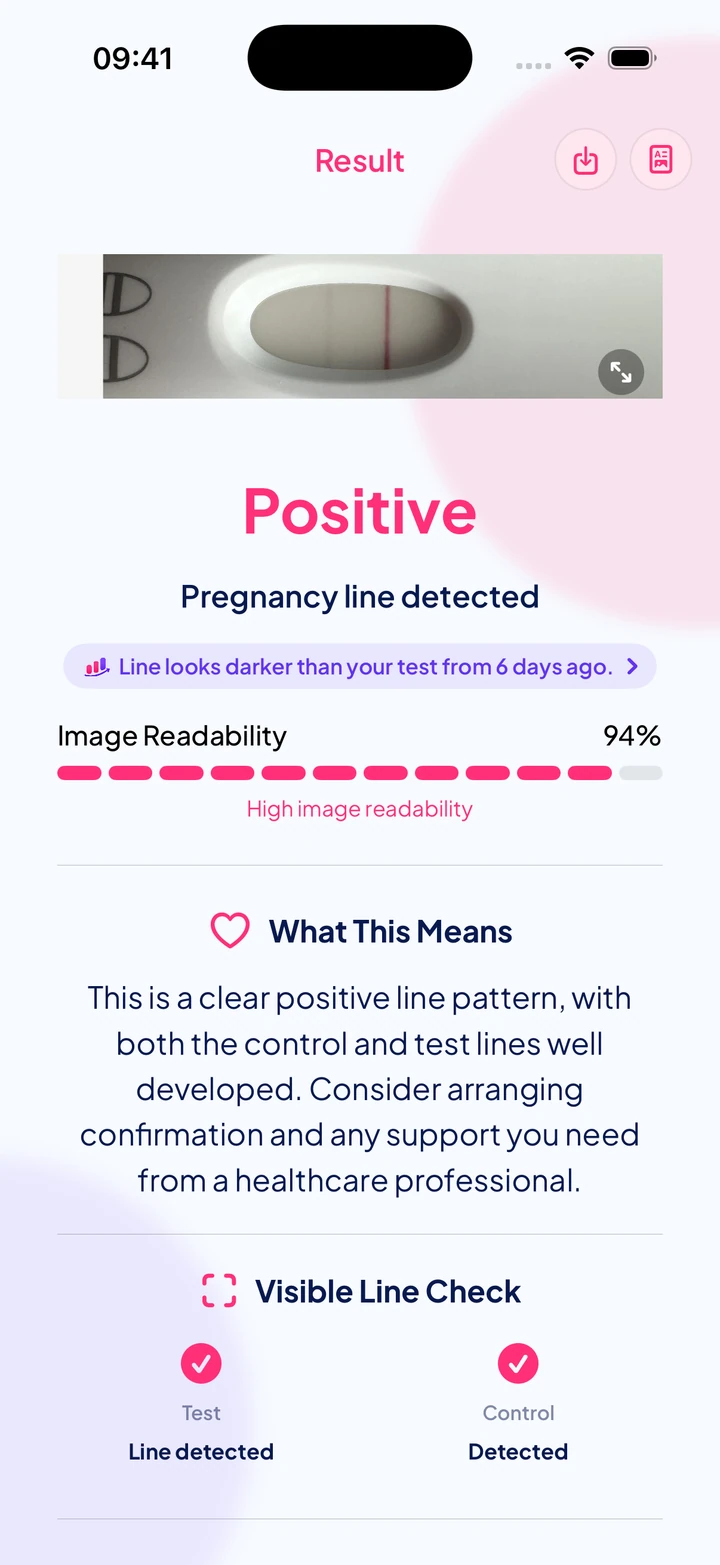
A clear result
Positive, faint, negative, unclear or invalid.
Both lines checked
Test line and control line, each detected.
Photo readability
Tells you when to retake the photo.
Compared to last time
Darker or lighter than your earlier test.
Saved with the date
Every test kept in date order.
On-device AI
Trained models read the test on your phone. Photos aren't uploaded.
Learn more
LineCheck reads photos of home tests. It can’t confirm or rule out a pregnancy — talk to a doctor or midwife if you’re unsure, or if you have pain or bleeding.
Questions
What should I look for in a faint-line pregnancy test checker app?
Look for support for your type of line test, a photo-readability check, dated history, side-by-side comparisons and a clear explanation of photo processing and cost. LineCheck offers these on iPhone, iPad and Android, with on-device image analysis. A scanner can misread a photo and cannot confirm pregnancy or reliably settle an evaporation-line question.
Can I scan a pregnancy test without uploading the photo?
Yes. LineCheck’s Luna Check feature analyses the image on your device, including rechecks. Optional chat and written guidance send text and result context through online services, not the test photo. Saved records may use your own iCloud sync or device backup, depending on settings.
Is LineCheck free to download, and are scans unlimited?
LineCheck is free to download and includes scanning with free allowances and ads. Free scanning is not unlimited. Pro removes ads and adds paid features, with monthly, yearly and one-time purchase options. Check the app for your current allowance and the store’s purchase screen for local prices before buying.
Can a pregnancy test scanner app see a line I can't?
LineCheck can make a faint line easier to look at — you can adjust the photo, and the scan reports whether a test line was detected. But it can only work with what the camera captured. If a line is too faint to show in a clear photo, the honest answer is to test again in a couple of days.
Does it work with any brand of pregnancy test?
Yes, as long as it’s a line test. LineCheck reads strips, cassettes and midstream tests from any brand, such as First Response, Clearblue’s non-digital tests, Easy@Home, Pregmate, Wondfo, One Step, Frida or a pharmacy or supermarket own brand, as long as they show a control line and a test line. You line the result window up with a template before scanning. Digital tests that show words or symbols can't be read this way.
What does the image readability score mean?
It's how confident LineCheck is that the photo is clear enough to judge: sharpness, lighting and whether the result window is fully visible. A low score means the photo, not necessarily the test, is the problem — retake it before drawing conclusions.
Should I photograph my test after the reading time?
No. Photograph it within the reading window in your test's instructions. Lines that appear after that window — sometimes called evaporation lines — can't be relied on, by eye or by an app.
Is a positive in LineCheck the same as a confirmed pregnancy?
No. LineCheck describes what's visible in your photo. A positive home test usually means pregnancy, but only a healthcare professional can confirm it, typically with a blood test or ultrasound.

Scan your next pregnancy test with LineCheck
Available on iPhone, iPhone Duo, iPad and Android.